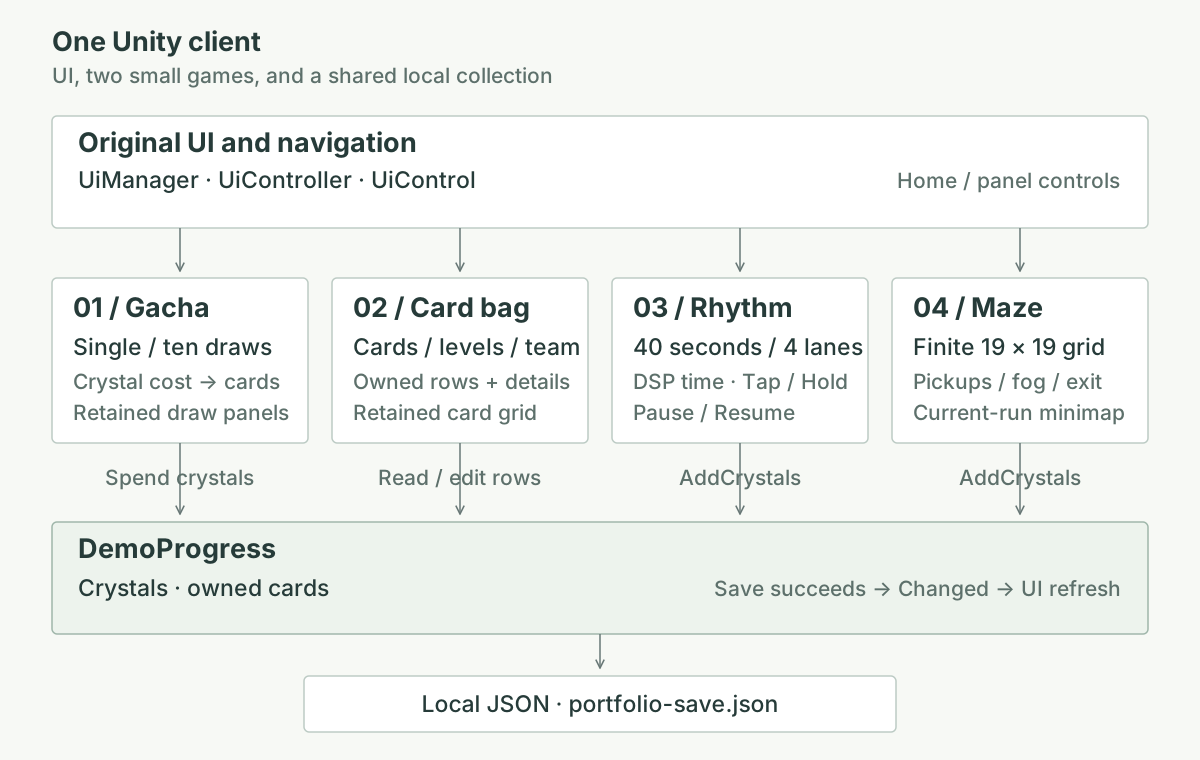
01 / Gacha
Spend crystals in the original draw screen
The single- and ten-draw buttons use the existing result layouts with CC0 landscape pictures. DemoProgress.Draw checks the balance, deducts the cost, selects catalog entries and adds the owned rows. A draw costs 100 crystals per card; catalog entries have equal selection chances.
GotchaMainController → GotchaResController.TryProcessDraw → DemoProgress.Draw → save → result screen / inventory refresh
The catalog defines a card's identity and image paths. Eligible duplicates join an existing stack; other draws create another owned row. The result screen displays the selected artwork after the save succeeds.
Illustrative fragment: one shared save boundary
snapshot = Serialize(data);
ApplyWalletAndOwnedRowsChange();
try { File.WriteAllText(savePath, Serialize(data)); }
catch { data = Deserialize(snapshot); return false; }
Changed?.Invoke();
return true;
Choice made
The shared save uses a direct JSON file write and a small in-memory rollback. Pickups and song rewards credit crystals directly to the wallet used by the draw buttons.
02 / Card inventory
Read owned cards through the original bag UI
ItemController displays owned cards, reads the local save and subscribes to Changed while visible. Each owned row keeps its quantity, level and team marker, separate from the catalog definition.
Open card bag → read DemoProgress.Cards → select a row → upgrade / mark / delete → save → Changed → refresh
Choice made
The existing grid cells and detail panel stay in use, with replacement CC0 card pictures. Level and team markers serve the collection screen. Maze and rhythm rewards appear in the shared crystal balance, ready to buy cards that then appear here.
03 / A short playable loop
Judge time, then draw the notes
SimpleRhythmController connects Unity input, audio, note visuals and results. SimpleRhythmRound holds the chart and judgement rules. The 40-second track uses four lanes with Tap and Hold notes; players press D, F, J and K, or click the lanes.
Scheduled DSP start → input time → SimpleRhythmRound → score / combo → completed result → DemoProgress.AddCrystals
The chart clock is AudioSettings.dspTime - dspStart, shared with AudioSource.PlayScheduled. The difference between input time and note time determines Perfect, Good or Miss. A Hold has a head and a tail: staying pressed until the tail completes it automatically; an early release can miss.
During play, the Pause / Resume button or Esc pauses and resumes the song, note movement and judgement clock together. Resuming continues the same round. BACK leaves an unfinished round without a reward; on the selection and result screens, Esc returns home.
Illustrative fragment: speed affects the view
songTime = AudioSettings.dspTime - dspStart;
round.Press(lane, songTime);
round.Advance(songTime);
noteY = hitY + (noteTime - songTime) * visualSpeed;
if (finished && accuracy >= 0.60)
    progress.AddCrystals(100);
Choice made
Visual speed changes note spacing while the music, chart timestamps and judgement windows stay fixed. One short chart and an original synthesized track make the full play-to-reward flow easy to try. Finishing at 60% accuracy or above earns 100 crystals.
04 / A new route each run
Explore a finite maze through the fog
Each entry creates a new 19 × 19 grid. FiniteMaze uses a randomized depth-first search to carve connected passages, then a breadth-first traversal selects an exit farthest from the entrance. Crystal pickups are placed on random walkable cells.
FiniteMazeController.Open → new FiniteMaze → movement / visibility / minimap → pickup or exit → DemoProgress.AddCrystals
The main view shows cells inside the player's visibility radius that pass CanSee, a grid line-of-sight check. A separate explored[,] array remembers every revealed cell, so the minimap keeps those areas visible after the player moves away.
Illustrative fragment: current view and remembered map
visible = InRadius(playerCell, cell)
          && maze.CanSee(playerCell, cell);
worldCell.SetActive(visible);
if (visible) explored[x, z] = true;
DrawMinimapCell(cell, explored[x, z]);
if (atExit) progress.AddCrystals(100);
Choice made
The maze character uses Kenney’s CC0 Mini Characters model, texture and idle / walk animations, connected to the same movement controller. Asset credits →
Exploration memory lasts for this maze run. Leaving and entering again creates a fresh maze and minimap; earned crystals remain in the JSON save. Each of the 12 pickups awards 20–40 crystals, and reaching the exit awards 100. A pickup is consumed, or the exit marked complete, only after the wallet save succeeds.
For a code conversation
Where I would start reading
Open these files in the public Unity project. Links point to the v0.1.3 source that matches the downloadable demo.
| Entry point | Responsibility |
|---|---|
| Scripts/UIFramework/UiManager.cs UiController.cs · UiControl.cs | Original panel and control conventions. |
| Scripts/UIFramework/GotchaResController.cs | Draw request and original result views. |
| Scripts/UIFramework/ItemController.cs | Owned card grid, details and collection actions. |
| Portfolio/Core/DemoProgress.cs | Wallet, owned rows, draw rules and local save. |
| Scripts/Rhythm/SimpleRhythmController.cs SimpleRhythmRound.cs | Audio/input adapter and timing rules. |
| Scripts/Sekai/FiniteMazeController.cs Sekai/FiniteMaze.cs | World presentation, fog, minimap and grid generation. |